- Top 5 our recommended YouTube TV VPNs
- Does YouTube TV work internationally?
- How to watch YouTube TV internationally?
- Best VPNs for YouTube TV: detailed overview
- How I tested the best YouTube TV VPNs
- How does YouTube TV determine location
- How to trick YouTube TV location with a VPN: detailed guide
- How to watch NFL games on YouTube TV
- YouTube TV VPN proxy detected: troubleshooting steps
- How to fix playback error on YouTube TV
- Can I use a VPN with YouTube TV?
- Best free VPN for YouTube TV
- Other ways to change location on YouTube TV
- What channels can I watch if I change my YouTube TV location?
- Final thoughts on using VPN with YouTube TV
- FAQ
YouTube TV does not work internationally. The service is strictly geo-restricted to the United States due to content licensing agreements.
To watch internationally, you have to trick your YouTube TV location with a VPN. All you have to do is get a premium VPN that reliably bypasses detection, such as NordVPN or Surfshark, and connect to a server in your desired city or region.
Based on my tests, NordVPN is the overall best VPN for YouTube TV, Surfshark is an affordable YouTube TV VPN, and Proton VPN is a secure but simple VPN with a free version available.
YouTube TV is a popular streaming platform that offers over 100 broadcast, cable, and regional sports networks, including major live sports events like the Premier League and the NFL, such as Thursday Night Football, Sunday games, and playoff matchups. However, YouTube TV is geo-restricted to the United States, with some channels even limited to specific states. To watch YouTube TV internationally, you need a reliable YouTube TV VPN.
A VPN for YouTube TV lets you change your IP address to a US location, allowing you to unblock YouTube TV and access all your favorite channels from anywhere in the world. This includes live NFL games, other major sports, and popular entertainment content. After testing more than 20 VPNs, NordVPN proved to be the best VPN for YouTube TV in 2026, offering fast HD and 4K streaming while easily bypassing YouTube’s geo-blocking restrictions.
Keep in mind that YouTube TV also tracks your device’s GPS location, so in some cases, you’ll need both a VPN and a GPS spoofing app to watch content. If you’re on Android, I recommend Surfshark, as it includes a built-in GPS spoofing feature. For iPhones, you can combine NordVPN with a third-party GPS spoofing tool such as FakeGPS.

Top 5 our recommended YouTube TV VPNs
| VPN for YouTube TV | Rating | Best for: | Servers | Servers in US | Price | Free trial |
|---|---|---|---|---|---|---|
| 1. NordVPN | 9.3⭐️⭐️⭐️⭐️⭐️ | Overall best VPN for YouTube TV | 8900 servers in 149 countries | ✅ Yes, 3,174+ | $ 3.49/month | ✅ Yes, 3 days for Android |
| 2. Surfshark | 9.0⭐️⭐️⭐️⭐️⭐️ | Most affordable YouTube TV VPN | 4500 servers in 100 countries | ✅ Yes, 600+ | $ 2.49/month | ✅ Yes, 7 days |
| 3. Proton VPN | 8.9⭐️⭐️⭐️⭐️⭐️ | Privacy-focused VPN to watch YouTube TV internationally | 20700 servers in 149 countries | ✅ Yes, 6,015+ | $ 2.99/month | ✅ Yes, free version available |
| 4. IPVanish | 8.5⭐️⭐️⭐️⭐️⭐️ | Beginners-friendly VPN that works with YouTube TV abroad | 3400 servers in 113 countries | ✅ Yes, 3,400+ | $ 2.49/month | ✅ Yes, 7 days |
| 5. ExpressVPN | 8.5⭐️⭐️⭐️⭐️⭐️ | Fast streaming VPN to watch YouTube outside the US | 3000 servers in 113 countries | ✅ Yes, 62+ | $ 2.99/month | ✅ Yes, 3 days |
Does YouTube TV work internationally?
YouTube TV is only available in the United States, so users outside the US cannot stream shows or live channels. If you try to access it from another country, you’ll see the error: “YouTube TV isn’t available in your country.” However, you can use a VPN to trick YouTube TV location and access your account while traveling internationally.
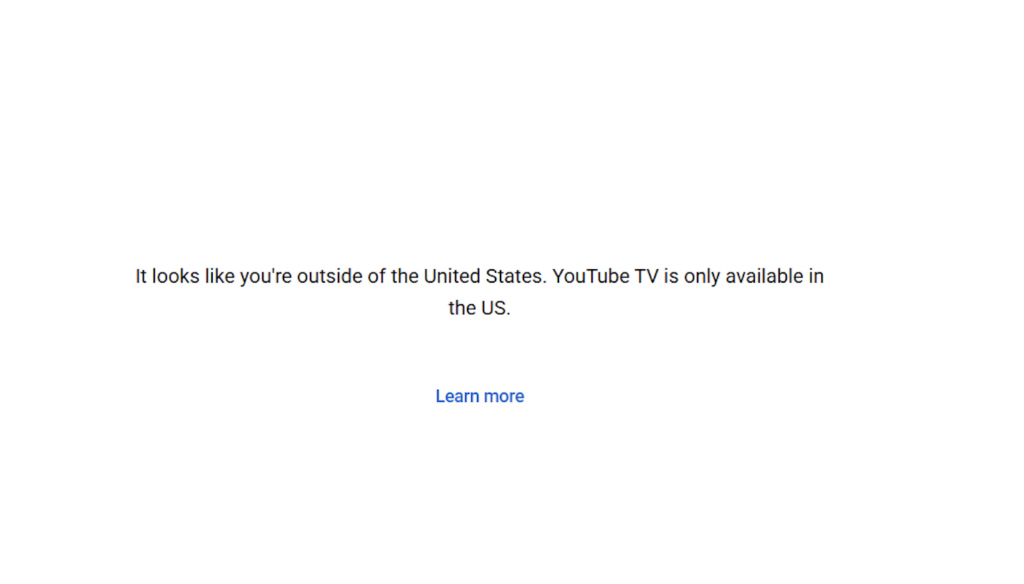
The best way to bypass YouTube TV location is by using a reliable streaming VPN. A VPN lets you connect to a US server and obtain a US IP address, which tricks the platform into thinking you’re in the right location. This not only helps you watch YouTube TV internationally but can also encrypt your internet traffic and improve your online privacy while streaming.
How to watch YouTube TV internationally?
To watch YouTube TV while traveling internationally, you need to connect to a US VPN server. This lets you bypass regional restrictions and access all live channels and shows from anywhere in the world. Make sure to pick a server in a state where your favorite channels are available for the smoothest streaming experience.
Note:
We often see reports on Reddit that claim YouTube TV blocks Sunday NFL Ticket games, even those shown outside of a user’s particular area. The solution is to simply connect to a VPN server in another state. Even if you’re located in the US, you might be affected by blackouts, especially if you live nearby an area that’s enforcing them. Use a VPN to change your IP address to another city in the US. I recommend NordVPN, as it lets you choose from 22 different US locations.
- Download a premium VPN. Sign up for a service known to bypass YouTube TV restrictions (such as NordVPN, Surfshark, or Proton VPN).
- Connect to a server. Select the specific US city hosting the local channels or sports broadcast you want to watch.
- Open Developer tools:.Open Google Chrome or Microsoft Edge, press F12 (or
Ctrl+Shift+I/Cmd+Option+I), and click the three dots in the top right corner of the developer panel. - Spoof HTML5 location. Go to More Tools > Sensors. Under the Location dropdown, select Custom location and enter the latitude and longitude coordinates of your chosen VPN city.
- Update YouTube TV: Navigate to YouTube TV, click your profile picture, go to Location > Current Playback Area, and click Update.
- Activate Developer options. Go to Android Settings > About Phone and tap Build Number 7 times.
- Enable Fake GPS. Download a highly rated “Mock GPS” app from the Google Play Store, go back to Developer Options, and set it as your active Mock Location App. (Note: If you use Surfshark, you can simply toggle on their native “GPS Override” feature inside the VPN app settings).
- Turn on your VPN to your desired city, then set your Mock GPS app to the exact same city.
- Refresh the app. Clear the cache of your YouTube TV app, open it, and let it sync to your new location.
- Turn off Wi-Fi on your iOS device and switch to Cellular Data to prevent network tracking.
- Open your premium VPN app on your iPhone/iPad and connect to your target US city.
- Turn on your VPN on a computer and connect to the exact same city.
- Open Chrome or Edge on your computer and press F12 (
Cmd + Option + Ion Mac). - Click the three dots in the top-right of the dev panel, choose More Tools, and select Sensors.
- Change the Location dropdown to Custom location and type in your VPN city’s Latitude and Longitude.
- Open the YouTube TV app on your iPhone, tap your profile, go to Location > Current Playback Area, and select Update.
- On your computer browser (keeping the Dev Tools panel open), go to youtube.com and sign in.
- Click Allow when the computer browser requests permission to access your location.
- Relaunch App: Force-close the YouTube TV app on your iPhone, reopen it, and begin streaming your unlocked channels.
Best VPNs for YouTube TV: detailed overview
If you want to watch YouTube TV internationally, you need a VPN with high-speed US servers, a large global network, and excellent unblocking capabilities. I have tested over 20 VPNs to curate the list of the best VPNs for YouTube TV. Not all of them were capable enough to bypass the YouTube TV detection system, were laggy or slow, or their price didn’t meet their value.
VPNs that work with YouTube TV
- NordVPN
- Surfshark
- Proton VPN
VPNs that don’t work with YouTube TV
- Hotspot Shield
- TunnelBear
- Hola VPN
Top 1. NordVPN: Best YouTube TV VPN overall
- Rating: 9.3⭐️⭐️⭐️⭐️⭐️
- Servers: 8900 servers in 149 countries, with over 2700 servers in the US
- Price: from $ 3.49/month with a 3-day free trial for Android and a 30-day money-back guarantee
NordVPN is the best VPN for YouTube TV, thanks to its wide coverage across the United States and full set of streaming features. With 2700+ servers in 16 US locations, I could change my YouTube TV location easily and unblock many YouTube channels, including live NFL or La Liga streams on YouTube TV+. Whichever server I chose, they were able to access YouTube TV but here is a list of ones that worked for me: Saint Louis (##10317, #10319, #10330, #10343), Los Angeles (#9829, #5861, #9409, #9284), and Miami (#6766, #9394, #9661, #11512).
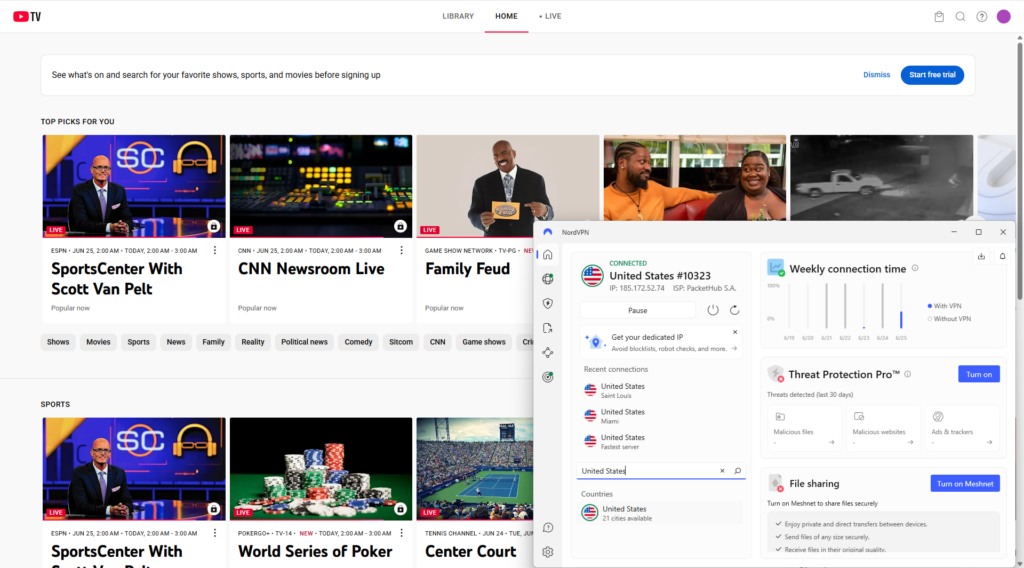
Thanks to NordVPN‘s 265-bit encryption, obfuscated servers, and no-log policy, my connection remained completely private at all times. With some of the fastest speeds I’ve ever seen on any VPN (on average, NordVPN retained around 94% of the original speed), I enjoyed my favorite TV channels without buffering or lagging.che
NordVPN is compatible with all major operating systems and can be used on 10 devices simultaneously. If you wish to see what this VPN can offer you, the NordVPN subscription starts at only $ 3.49/month. Make sure you use the 30-day money-back guarantee or a 3-day free trial if you have an Android device! It is a great way to test if the service works with YouTube TV and meets your needs. You can cancel at any point.
Things I like
- Easily unblocks YouTube TV
- 2700+ VPN servers in the US
- Obfuscation features to bypass geo-blocks
- Very fast connection speeds for lag-free streaming
- 10 simultaneous connections
- 30-day money-back-guarantee
Things I didn’t like
- Desktop app requires you to sign in through the browser
If you want to read all about our own experience testing and using this VPN — one of the best VPNs — make sure to check out our extensive NordVPN review.
Top 2. Surfshark: Cheapest VPN for YouTube TV
- Rating: 9.0⭐️⭐️⭐️⭐️⭐️
- Servers: 4500 servers in 100 countries, with 600 servers in the US
- Price: from $ 2.49/month with a 7-day free trial and a 30-day money-back guarantee
Surfshark is one of the best YouTube TV VPN due to 600+ secure servers in the US, fast speeds, and unlimited simultaneous connections. It covers 16 US states, granting you access to a variety of local content. I successfully unblocked the platform while traveling across Europe. Most of the time, I used servers in locations such as New York, Detroit, or Los Angeles. While Surfshark doesn’t allow choosing a specific server, I encountered no blacklisted servers that would overshadow VPN’s ability to unblock YouTube TV.
YouTube TV often requires GPS-based location verification, and this can be a problem since most VPNs are unable to spoof GPS data. That’s where Surfshark stands out, as it includes a built-in GPS spoofing feature called GPS Override. While it’s only available on Android devices, it helps match your GPS location to your VPN server, making it much easier to access YouTube TV without interruptions.
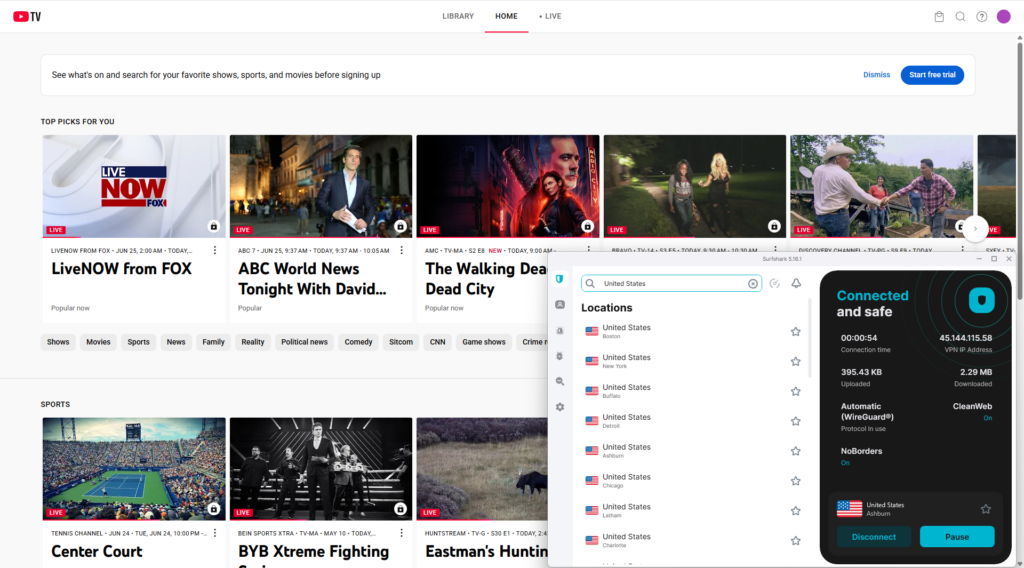
Surfshark retains great speeds that are just slightly slower than NordVPN’s. During my tests, I had around 93% speed retention on average. Because of this, I never experienced lag or connectivity issues while streaming YouTube TV.
In terms of security, you also won’t be disappointed. Surfshark employs modern WireGuard tunneling protocol and military-grade encryption to successfully avoid YouTube TV VPN detection. In addition, it handles zero IP and DNS leaks so my true location was never exposed. You can also use obfuscation to get past the strictest geo-blocks. The built-in ad blocker and malware protection is just an added bonus!
Finally, I recommend Surfshark for its user-friendly apps and affordable subscription plans! With Surfshark pricing starting at $ 2.49/month, you can enjoy this premium YouTube TV VPN for less than the price of a cup of coffee. Plus, Surfshark offers a 7-day free trial and a 30-day money-back guarantee, so you can enjoy YouTube TV with Surfshark completely free for over a month.
Things I like
- Unblocks YouTube TV
- Plenty of coverage in the United States with 600+ servers
- Lightning-fast speeds with no lagging or buffering
- Obfuscated servers to get past geo-blocks
- Unlimited simultaneous connections
- 7-day free trial and a 30-day money-back guarantee
Things I didn’t like
- You can't manually select a specific server

We covered all of Surfshark’s features in our Surfshark VPN review.
Top 3. Proton VPN – freemium VPN that works with YouTube TV
- Rating: 8.9⭐️⭐️⭐️⭐️
- Servers: 20700 servers in 149 countries, with 600 servers in the US
- Price: from $ 2.99/month with a 30-day money-back guarantee
Proton VPN is the best freemium VPN for YouTube TV. It offers a well-rounded, entirely free version, which you can use for casual, everyday needs. While Proton VPN doesn’t throttle free version speeds, it was not always reliable at unblocking YouTube TV. Yes, it has servers in the US (in addition to the Netherlands, Japan, Romania, and Poland), but you can’t select which country you want to connect to. If you’re lucky, you will get a US server that will be able to unblock YouTube TV.
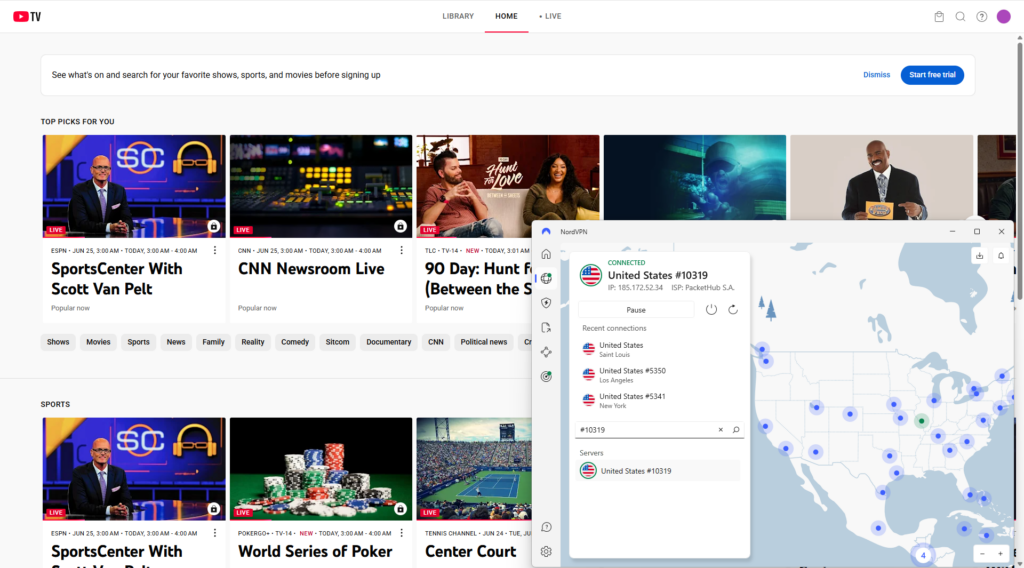
If you want a reliable and risk-free option, the premium version of Proton VPN is a top choice for YouTube TV. With over 3,500 US servers, it easily unblocks the platform from anywhere in the world. I tested multiple servers – including Miami (US-FL#79, US-FL#83, US-FL#84), Los Angeles (US-CA#283, US-CA#286, US-CA#287), and Dallas (US-TX#204, US-TX#206, US-TX#336) – and all worked flawlessly. Proton VPN also maintained around 85% of my original internet speed, ensuring smooth streaming and a lag-free viewing experience throughout.
Proton VPN is one of the most secure YouTube TV VPNs. It employs modern security features such as a kill switch, AES-256 encryption, and IP and DNS leak protection. All of them ensured that my true location stays hidden and I can bypass YouTube TV VPN detection systems.
Premium Proton VPN version costs $ 2.99/month. Despite a free version, every subscription is covered by a 30-day money-back guarantee that grants your money back if you are not satisfied with the service.
Things I like
- Unblocks YouTube TV
- Over 3500 servers in the US
- Reliable free version
- 30-day money-back guarantee
- Extra secure
Things I didn’t like
- You can’t select servers with a free version

Read more about it in our Proton VPN review.
Top 4. IPVanish – secure VPN to watch YouTube TV internationally
- Rating: 8.5⭐️⭐️⭐️⭐️
- Servers: 3400 servers in 113 countries, with 1,000 servers in the US
- IPVanish price: from $ 2.49/month with a 30-day money-back guarantee
IPVanish is one of the best YouTube TV VPNs for strong speeds and flexibility when streaming YouTube TV from the US. While it doesn’t offer dedicated streaming servers, its vast network of 1,000+ US servers made it easy to find workable options in my tests. I unblocked and streamed the Premier League without being inside the country.
Combined with the ultra-fast WireGuard protocol, you can get extremely fast download speeds that averaged over 400 Mbps during my tests. I recommend connecting to a server like Seattle, as that was the location that gave me top speeds and easy unblocking.
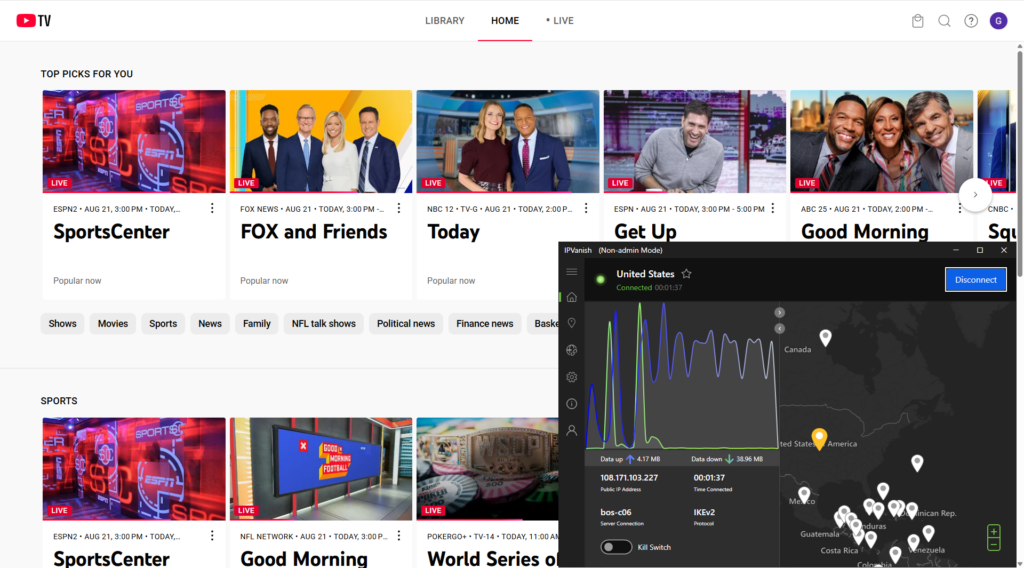
Security-wise, IPVanish offers AES-256 encryption, a working kill switch as proven in my test circuit, and DNS leak protection that helps keep your true location hidden to avoid sudden geo-blocks. Split tunneling also meant I could stream on YouTube TV without impacting other services and websites I wanted to keep localized on my everyday device.
Things I like
- Can unblock YouTube TV including live sports
- Unlimited simultaneous devices
- WireGuard protocol for fast streaming speeds
Things I didn't like
- Not the fastest streaming VPN
- Free trial limited to mobile devices

Top 5. ExpressVPN – reliable VPN to trick YouTube TV location in 2026
- Rating: 8.5⭐️⭐️⭐️⭐️
- Servers: 3000 servers in 113 countries, with 62 servers in the US
- Price: from $ 2.99/month with a 3-day free trial and a 30-day money-back guarantee
ExpressVPN is a solid YouTube TV VPN that guarantees ultra-fast speeds, powerful unblocking and streaming performance, and a very simple-to-use app. To unblock YouTube TV in my tests, I accessed servers like Washington, Chicago, and Los Angeles with download speeds at around 385 Mbps. Regardless of server choice, I was able to access YouTube TV+ from outside of the US, and DNS and IP leak protection ensured I wasn’t blocked in the middle of a stream.
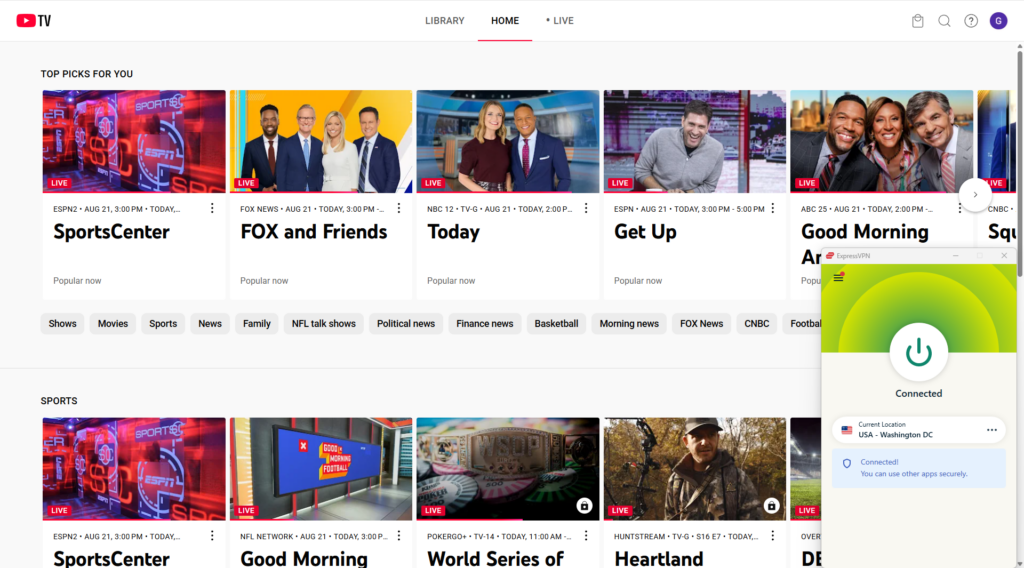
I got the best speeds when connecting with ExpressVPN’s proprietary Lightway protocol. The MediaStreamer smart DNS feature also helped me connect devices without VPN apps like my smart TV so that I could stream away from my computer. ExpressVPN also supports router installations, which will allow you to protect all your devices with a single installation.
ExpressVPN starts at $ 2.99/month. You can also try it with a 3-day free trial on iOS and Android, while first-time customers who subscribe directly get a 30-day money-back guarantee.
Things I like
- Reliably unblocks YouTube TV
- Lightning-fast speeds with WireGuard protocol
- Highly beginner-friendly app
Things I didn't like
- Relatively small number of US servers

How I tested the best YouTube TV VPNs
To ensure I can give you my best recommendations for the best YouTube TV VPN, I have paid specific attention to the following aspects while testing:
- Bypass YouTube TV blocks (30%). In the first place, I checked whether the VPNs were actually able to get around YouTube TV blocks. Servers in the US: To unblock YouTube TV from anywhere, a VPN must have plenty of working US servers.
- Speed and performance (30%). The best streaming VPNs run smoothly in the background of your device. I made sure to run extensive speed tests to differentiate between VPNs.
- Privacy features (20%). The best VPNs have modern security and privacy features to remain undetected. This is essential in unblocking streaming services. Obfuscation features, for example, make your VPN more secure and also mask your VPN traffic.
- Value for money (20%). The VPNs I recommend all have great price-to-value ratio. You will get the best service for less than a few bucks.
How does YouTube TV determine location
YouTube TV determines your location using a combination of device hardware signals, network data, and account settings to comply with regional broadcasting and sports licensing rules.
How YouTube TV verifies your location:
- IP Address Geolocation: On smart TVs, streaming sticks, and computers, YouTube TV checks your IP address against geolocation databases to identify your current media market.
- Mobile Device GPS: On phones and tablets, the app pulls precise hardware data via integrated GPS, nearby Wi-Fi networks, and cell towers. YouTube TV frequently uses mobile GPS verification to confirm living room device locations at
[tv.youtube.com/verify](https://tv.youtube.com/verify). - Home Area vs. Current Playback Area: Your residential ZIP code establishes your permanent “Home Area” for local channels and DVR access. When traveling, your “Current Playback Area” temporarily switches to match local stations in your physical location.
How to trick YouTube TV location with a VPN: detailed guide
If you’ve been wondering how to watch YouTube TV internationally, you can use a VPN. A VPN will help you get around YouTube TV blocks when you’re outside of the United States. Here’s how to go about it:
Step 1. Get a reliable VPN that works with YouTube TV
NordVPN is my top recommendation for YouTube TV, as it offers 2700+ servers in the United States and can successfully bypass YouTube’s geographical restrictions, as well as those on other streaming sites.
Step 2. Install the VPN app and connect to a US server
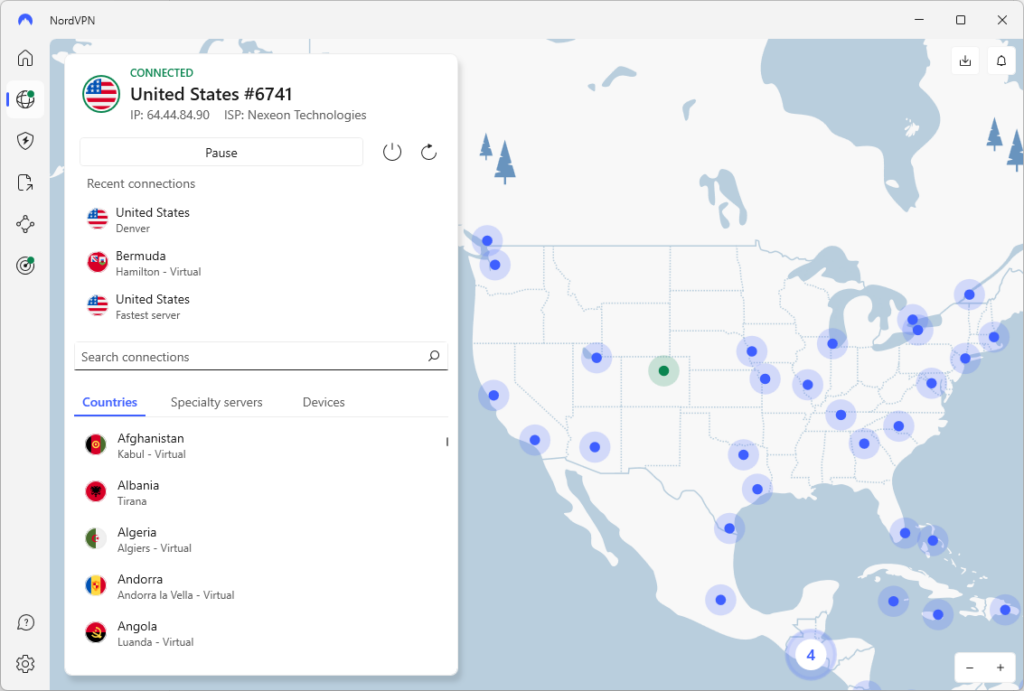
After subscribing to NordVPN, download and install the app on your device. Open the app and connect to a US server to access YouTube TV, ideally in a state where the sports channels you want are available. For example, choose a server in New York or California to watch Premier League matches on NBC Sports, or in Texas or Florida to catch NFL games on ESPN or NFL Network. NordVPN’s 2,700+ US servers are optimized for streaming, providing fast, stable connections with minimal buffering – allowing you to watch YouTube TV and live sports from anywhere in the world without restrictions.
Step 3. Clear your browser’s cache and cookies
Cache and cookies collect your personal data, which can expose your true location to the YouTube TV detection system. Clean them regularly to avoid such a problem, and your VPN will be able to unblock YouTube TV. Here are the quick steps for each browser:
- Chrome: Click the three dots (More) > More tools > Clear browsing data.
- Firefox: Click the three lines (Menu) > History > Clear Recent History.
- Edge: Click the three dots (More) > Settings > Privacy, search, and services.
- Safari: Click Safari > Preferences > Privacy > Manage Website Data > Remove All.
Step 4. Log in to your YouTube TV account and start streaming
A VPN will unblock YouTube TV, so you will be able to log in to your account. Now you can start streaming without any geographical barriers!

How to watch NFL games on YouTube TV
New subscribers to YouTube TV can choose between the Base and Spanish subscriptions. Alternatively, there’s a NFL Sunday Ticket plan, which includes a greater level of content but requires the Base account too.
If you have YouTube TV Base, you get access to over 100 live TV channels, unlimited DVR recording storage, and you can have up to 6 household members using the same account. Once subscribed, you can also add the NFL Sunday Ticket or NFL Sunday Ticket with NFL RedZone for the greatest access to sports streams.
Note:
If you’re not in the US, you can still unblock YouTube TV and NFL streams by using NordVPN to change your IP address.
YouTube TV VPN proxy detected: troubleshooting steps
The YouTube “VPN/proxy detected” error occurs when the YouTube TV servers detect VPN usage on your IP address and block your access to the service. The platform analyzes users’ IP addresses and geolocation data to identify unauthorized access attempts. If you see this error, it is because YouTube TV detects that your connection is routed through the VPN server rather than your true location.
How to fix the “YouTube TV VPN proxy detected” error:
- Firstly, check if your connection is secure using our guide to VPN leak testing.
- Next, clear your browser cache to remove old location data that could interfere.
- Next, try to use a different browser, or opening YouTube TV in Incognito or private browsing mode.
- Choose and connect to a different NordVPN server in the US, in case YouTube has blacklisted the first server.
- Disable any browser extensions, as they could interfere with your VPN’s service.
- If all else fails, I recommend speaking to your VPN’s customer support who can usually resolve these problems quickly.
How to fix playback error on YouTube TV
If you’re getting a playback error, this may be caused by connectivity issues or technical glitches. In some instances, it might occur after switching locations with a VPN.
TRY THIS FIRST!
The first thing you want to do is update your YouTube playback area. Within the YouTube TV app, click on your profile picture and go to Location. Tap Update for Current playback area and adjust your area.
Here are some other tips and tricks to fix playback errors on YouTube TV:
- Check your internet connection. Disconnect and reconnect to your network. Consider rebooting your router.
- Log out of a device. If you’re connected to more than three devices, this may be the issue. Make sure other users on your account are not streaming YouTube TV at the same time.
- Restart the YouTube TV app. This may resolve general issues.
- Clear your cache and cookies. Clearing your browsing data often eliminates errors.
- Reinstall/update your VPN app. If the issue is in your VPN app, make sure you’ve got the latest version installed on your device.
- Change your device’s location settings. Watching YouTube TV on mobile devices often requires you to adjust your location settings within the settings of your device itself.
If these steps don’t work, consider contacting your VPN’s support team. Often, the 24/7 customer support service can offer useful advice!
Can I use a VPN with YouTube TV?
Yes, you can use a VPN with YouTube TV to bypass geographical restrictions and access YouTube TV from outside the US. Since YouTube TV is a US-based service, the website blocks foreign IP addresses. However, connecting to a VPN changes your IP address, so if you connect to a US VPN server, you can bypass the geo-blocks to use the service from anywhere in the world.
Best free VPN for YouTube TV
Using a free VPN for YouTube TV might be tempting, but I don’t recommend it. Yes, it may bypass YouTube TV VPN detection and unblock streaming content, but the outcome is not always reliable. In addition, many free VPNs use alternative ways to gain profit, such as stuffing their apps with ads or selling your data to third parties. Moreover, some services can even have malicious intent and infect your devices with malware or other cybersecurity threats.
If you determined to try a free option, the best free VPN for YouTube TV is Proton VPN. It offers dependable access to YouTube TV without data limits, making it a great choice for streaming without extra cost. On the other hand, NordVPN is the best YouTube TV VPN and offers a 3-day free trial for Android users. Beyond that, you can use it risk-free for 30 days on any device with its money-back guarantee. After a month, you can repeat the process with another provider, such as Surfshark. This way, you will keep your online presence safe without spending additional money.
Other ways to change location on YouTube TV
Using a VPN is the easiest way to bypass restrictions on YouTube TV, but there’s another way. If you update your Home Area on YouTube, you won’t need any extra software, though you can only change your Home Area twice per year. After that, a VPN becomes your only option since YouTube TV locks the setting until the period lapses.
Your Home Area is linked with your US zip code, which YouTube TV uses to serve up the region-appropriate content for your area. Due to this, changing your Home Area can directly change what content you’re allowed to watch.
- Open YouTube TV in your browser, or launch the YouTube TV app on your Android device.
- Tap on the profile picture in the upper-right corner.
- Go to Settings > Area > Home Area.
- Tap on Update.
- Enter the zip code linked to your chosen location.
- Confirm your settings, and YouTube TV will update your Home Area .
- On your iPhone or iPad, open the YouTube TV app.
- Tap on the profile picture in the upper-right corner.
- Go to Settings > Area > Home Area.
- Tap on Update Home Area.
Enter your preferred zip code and confirm the change.
What channels can I watch if I change my YouTube TV location?
Changing your YouTube TV location can unlock different channels that are otherwise unavailable to you. While certain channels, such as ABC, CBS, FOX, ESPN, CNN and more, are available across the United States, other channels are not.
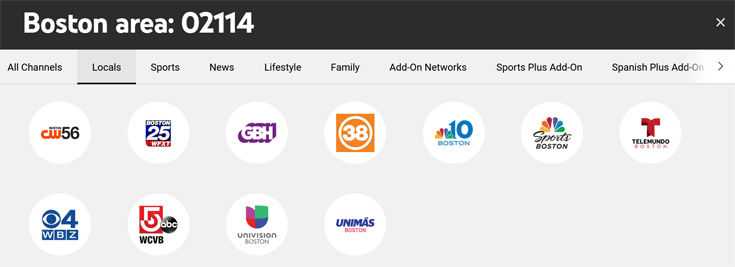
For example, if you’re located in the Boston area, you will get access to local channels such as Unimás Boston, Univision Boston, and WBZ-TV.
By contrast, if you’re in the Philadelphia are, you’ll see channels such as Fox 29 Philadelphia and CNBC Sports Philadelphia.
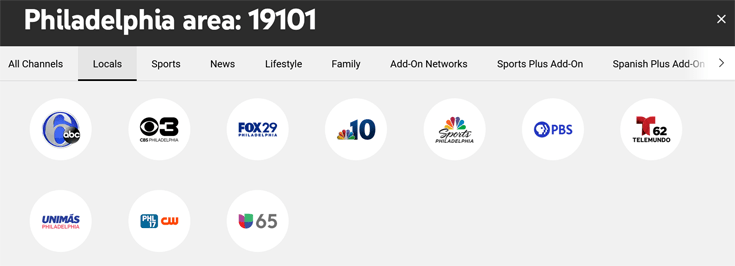
With a VPN, you can bypass geographical restrictions and watch local TV channels on YouTube TV, no matter where you are.
Final thoughts on using VPN with YouTube TV
YouTube TV is unavailable outside the US, but with a VPN, you can stream it from anywhere in the world. A VPN hides your true location by assigning a US IP address, allowing you to bypass geographic restrictions and access YouTube TV no matter where you are.
Here's how to watch YouTube TV from abroad:
Choose a trusted VPN for YouTube TV > Download and install the VPN app > Connect to a fast US server > Log in to your YouTube TV account > Enjoy streaming YouTube TV from anywhere in the world
After testing over 20 reputable VPNs, NordVPN stands out as the best choice for YouTube TV. With 2,700+ ultra-fast U.S. servers, it reliably bypasses YouTube TV’s detection system, unblocks the platform from anywhere, and ensures smooth streaming. NordVPN is secure, user-friendly, and offers excellent value, making it the top pick for streaming YouTube TV internationally.
For more information, have a look at these related articles:
- Best Fox Sports VPNs
- Best Free VPNs for the USA
- The Best VPN for Smart TV
- The Best Gaming VPN: Our 5 Top-Level Picks
- VPNs for FuboTV
FAQ
Do you have any questions about streaming YouTube TV with a VPN? Have a look at our FAQ section for some quick answers!
No, YouTube TV doesn’t work in Europe as the streaming platform is region-locked to the US. If you’re located outside the US however, you can unblock YouTube TV using a VPN to change your IP address. When you connect to a US VPN server, you can unblock YouTube TV and stream without restrictions. I recommend NordVPN as it successfully bypassed blocks during my tests and offers the best streaming speeds in HD and 4K.
Based on hands-on testing, NordVPN is the top choice for streaming YouTube TV from Europe, preserving over 90% of base connection speeds for smooth 4K viewing while its built-in SmartPlay technology easily circumvents YouTube TV’s strict proxy detection across 3,231+Does YouTube TV work with vp servers.
YouTube TV is only available in the United States. While you can access YouTube TV while traveling in different parts of the US, your available content can differ based on your US location. If you are outside the US, you can only use YouTube TV if you use a VPN to change your IP address. Connect to a VPN server in the US to unblock the website using a service like NordVPN, our recommended streaming VPN.
Yes, you can watch YouTube TV while traveling internationally. While the platform is only available in the US, a reliable VPN, such as NordVPN, can help you bypass geographical restrictions. By connecting to a server in the US, you will get a new IP address, which allows you to unblock YouTube TV from anywhere.
To watch YouTube TV internationally, first choose a VPN service provider like NordVPN, then download and install it on your streaming device, and connect to a US server. You will get a US IP address, which bypasses geographical restrictions and grants access to YouTube TV.
YouTube TV isn’t available in Italy due to geo-restrictions, as it is a US streaming service that blocks IP addresses in other countries. However, you can unblock YouTube TV from Italy and any other country using a VPN. Change your IP address with a VPN like NordVPN to unblock YouTube TV and stream from anywhere in the world.
YouTube TV is a US-only streaming service and so is usually inaccessible from the UK. However, you can change your IP address with a VPN by connecting to a US VPN server, which will unblock the website from the UK. I recommend NordVPN, which easily bypasses YouTube’s geo-blocks during my tests from Manchester, UK.
Yes, YouTube TV includes major networks like CBS, FOX, NBC, and ESPN so that you can stream the majority of NFL games live. YouTube TV also has the NFL Sunday Ticket add-on for accessing out-of-market games, but bear in mind that regional blackouts can still apply. Fortunately, you can also use a VPN like NordVPN to region hop in the US and bypass restrictions by connecting to a server in another state that has no restrictions.
To add an NFL package to YouTube TV, open YouTube TV in your browser or app, open Settings then Membership, then locate the Sports add-ons. Choose the NFL Sunday Ticket with or without RedZone access, and confirm your purchase to finish. This will also adjust the cost of your monthly subscription.
Yes, YouTube TV works with a VPN. However, not all VPNs are capable of avoiding YouTube TV system detection. To work, a VPN must have strong security features and plenty of US servers. In my practice, NordVPN, Surfshark, and Proton VPN work best with YouTube TV.
Yes, YouTube TV actively blocks VPNs to maintain its broadcasting agreements. YouTube TV is a US streaming service, so it blocks foreign IP addresses. It can also detect and block poor-quality VPNs that lack the security features needed to avoid geo-blocks. I recommend choosing a VPN like NordVPN that I’ve tried and tested successfully with YouTube TV
Based on my tests, the best VPN for YouTube TV is NordVPN, which has over 2700 servers in the US and easily bypassed geo-blocks during my in-house tests. Its speeds are the best in the industry for HD and 4K streaming, and its obfuscation features ensure that YouTube won’t detect and block your VPN connection.